

Motorola LCD Display Flex Cable for Board-to-Display Connection
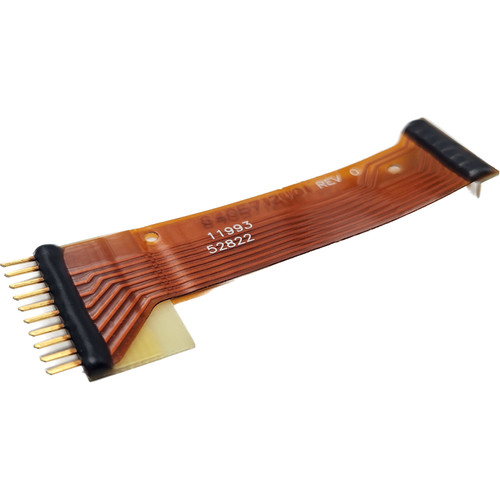
This is a Motorola flexible printed circuit board (flex PCB) that provides the electrical interconnection between the main circuit board and the LCD display in various Motorola two-way radio models. The orange polyimide flex cable is clearly marked with "8405712U01 REV 0" along with identification numbers "11993" and "52822". This flexible interconnect features multiple fine-pitch conductor traces running the length of the cable, with connector terminations on both ends - one end has individual pin contacts with black overmolding, while the other end features what appears to be a contact pad array with black reinforcement. A small yellow protective film or stiffener is visible at one end near the connector area.
Key Features
- Motorola flexible PCB for LCD display connection
- Orange polyimide substrate for flexibility and durability
- Part number marking: 8405712U01 REV 0
- Additional identification: 11993, 52822
- Multiple fine-pitch conductor traces for display data and control signals
- Black overmolded connectors on both ends for secure connection
- Yellow protective film/stiffener at connector area
- Critical component for LCD display operation
Compatible Models
- Various Motorola two-way radio models (consult service documentation for specific compatibility)
What's Included
- One (1) LCD Flex PCB Interconnect Cable
Application & Installation
This LCD flex cable is a delicate component that requires careful professional installation by a qualified radio technician. The flex PCB carries display data, control signals, and possibly backlight power between the radio's main board and the LCD screen. Replacement is necessary when the display becomes blank, shows corrupted images, exhibits intermittent operation, or completely fails due to flex cable damage. Common causes of flex cable failure include repeated flexing beyond the design limits causing trace fractures, pinching or crushing during improper reassembly, contamination from liquids or debris, or connector damage from forceful insertion or removal. Installation involves complete radio disassembly, careful disconnection of the failed flex cable from both the main board and LCD display connectors, routing the new flex cable along the exact original path without sharp bends or kinks that could damage the traces, proper insertion into both connectors ensuring full seating and correct orientation, and verification that the display operates correctly before final reassembly. The flex cable must not be bent sharply, twisted, or stressed during installation, as this will damage the internal copper traces even if no visible damage is apparent. Pay special attention to the yellow stiffener area, which is designed to provide strain relief at the connector junction. Due to the fragile nature of flex PCBs and the precision required for proper connector mating, this repair should only be performed by experienced technicians familiar with handling flexible circuits and working with fine-pitch connectors. Improper installation can result in immediate display failure or intermittent problems that worsen over time.
Manufacturer Part Number: 8405712U01
Revision: REV 0
Identification Numbers: 11993, 52822